Claude Desktop with OpenRouter is only guaranteed to work with the Anthropic first-party provider. For maximum compatibility, we recommend setting Anthropic 1P as top priority provider when using Claude Desktop.
Anthropic’s API occasionally experiences outages or rate limiting. When you route Claude Desktop through OpenRouter, your requests automatically fail over between multiple Anthropic providers. If one provider is unavailable or rate-limited, OpenRouter seamlessly routes to another, keeping your sessions uninterrupted.
For teams and organizations, OpenRouter provides centralized budget management. You can set spending limits, allocate credits across team members, and prevent unexpected cost overruns. This is especially valuable when multiple team members are using Claude Desktop across your organization.
OpenRouter gives you complete visibility into how Claude Desktop is being used across your team. Track usage patterns, monitor costs in real-time, and understand which projects or team members are consuming the most resources. All of this data is available in your OpenRouter Activity Dashboard.
OpenRouter exposes an API that is compatible with the Anthropic Messages API.
Gateway Mode: When you configure Claude Desktop to use the Gateway backend with https://openrouter.ai/api, the app speaks its native Anthropic protocol directly to OpenRouter. No local proxy server is required.
Anthropic Skin: OpenRouter’s “Anthropic Skin” behaves exactly like the Anthropic API. It handles model mapping and passes through advanced features like “Thinking” blocks and native tool use.
Billing: You are billed using your OpenRouter credits. Usage (including reasoning tokens) appears in your OpenRouter dashboard.
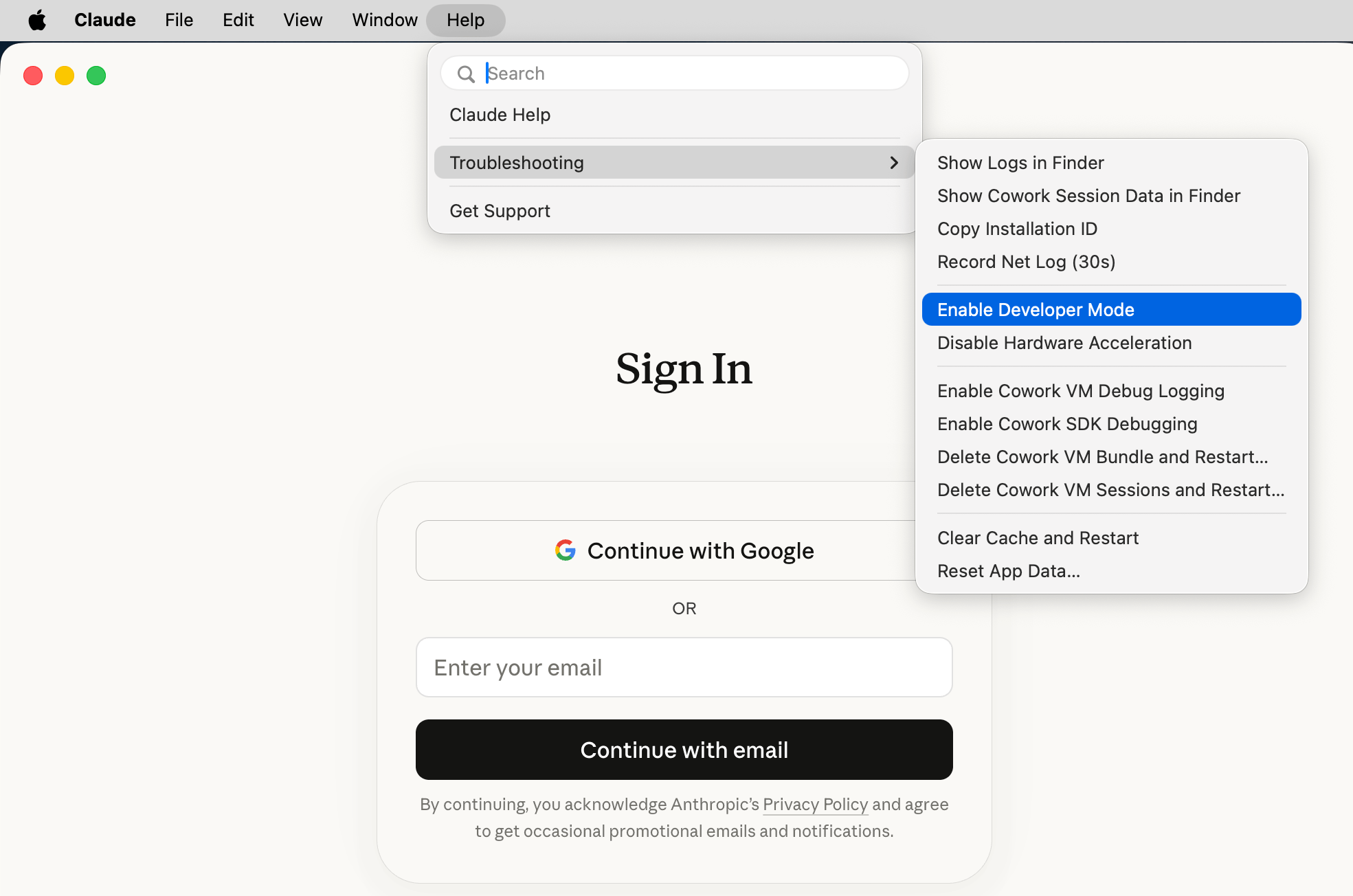
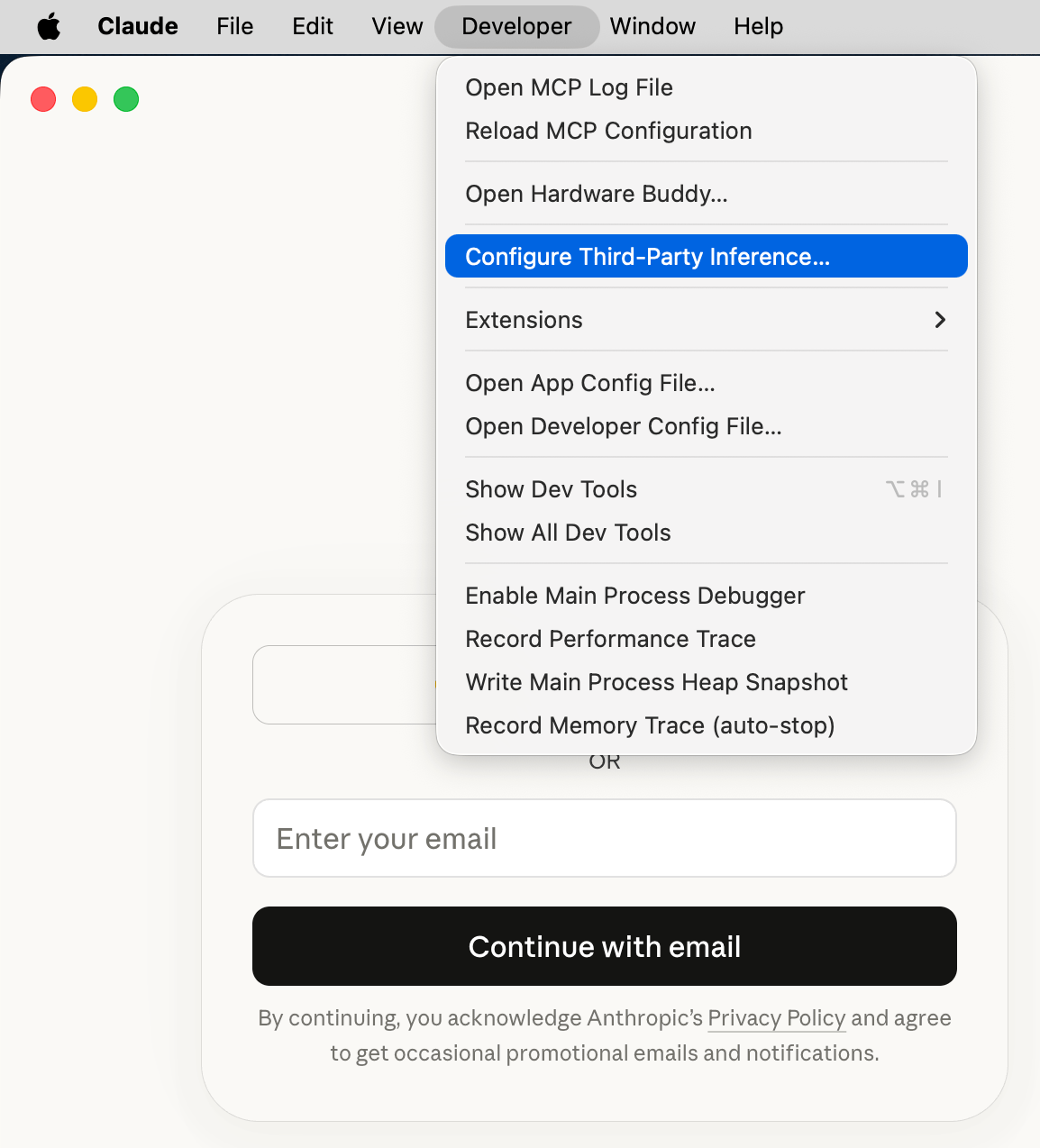
Launch Claude Desktop — you do not need to sign in. Open Help > Troubleshooting and click Enable Developer Mode. This adds a Developer menu to your menu bar.
Set the connection to Gateway and enter your OpenRouter credentials:
Field
Value
Gateway base URL
https://openrouter.ai/api
Gateway API key
Your OpenRouter API key (e.g. sk-or-v1-...)
Gateway auth scheme
bearer
Credential kind
Static API key
Credential kind pins which credential source the gateway uses. Set it to Static API key so Claude Desktop always authenticates with the OpenRouter API key you entered above and does not fall back to another source.
Newer builds of Claude Desktop add optional Sign-in session lifetime and Gateway SSO IdP (OIDC) fields (Client ID, Issuer URL, Authorization URL) to this panel. When you authenticate with a static API key as shown above, leave the OIDC IdP fields blank. The OIDC option is only for gateways that act as (or sit behind) their own OAuth authorization server.
Click Apply Changes (labelled Apply locally in older builds) to save your settings.
Fully quit Claude Desktop and reopen it. On the start screen, choose Continue with Gateway (shown as “Local configuration”). No Anthropic account is needed.
Claude Code is Anthropic’s separate CLI-based coding agent that also works with OpenRouter. If you prefer a terminal workflow, see our dedicated Claude Code integration guide for environment variable setup, model configuration, fast mode, and GitHub Action integration.
Connection Errors: Double-check that your Gateway base URL is exactly https://openrouter.ai/api and your API key is valid. Make sure the auth scheme is set to bearer.
No Models Appearing: Ensure you have credits in your OpenRouter account. Visit openrouter.ai/credits to check your balance.
“Continue with Gateway” Not Showing: Make sure you applied the settings locally and fully restarted Claude Desktop (quit and reopen, not just close the window).
“Access to this website is blocked by your network egress settings” using WebFetch: Claude Desktop sandboxes tool traffic by default, which can block the WebFetch tool from reaching sites you haven’t allowlisted. This applies to both Cowork and Claude Code. Open Developer > Configure Third-Party Inference…, switch to the Workspace restrictions tab, and add the required hosts to Allowed egress hosts.
TLS connection errors using Claude Code inside Claude Desktop: Claude Code runs in a sandbox whose network isolation can break TLS connections to the gateway. Relax it by adding the following to a Claude settings file, then restart Claude Desktop:
Pick the settings file that matches how widely you want the change to apply — ~/.claude/settings.json applies it to every project, while .claude/settings.json or .claude/settings.local.json inside a project scopes it to that project. In all cases it relaxes sandbox network isolation for all agent-initiated network traffic, not just gateway TLS connections, so prefer the narrowest scope that fixes your problem and remove it once you no longer need it.
Privacy: OpenRouter does not log your prompts unless you explicitly opt-in to prompt logging in your account settings. See our Privacy Policy for details.
Was this page helpful?
{"docsConfig":{"theme":"mint","$schema":"https://mintlify.com/docs.json","name":"OpenRouter | Documentation","colors":{"primary":"#7624F4","light":"#7624F4","dark":"#C8FF00"},"logo":{"light":"https://mintcdn.com/openrouter-d02e98a0/ksNSeB_K7gD-BUDh/assets/logo-v2-light.svg?fit=max\u0026auto=format\u0026n=ksNSeB_K7gD-BUDh\u0026q=85\u0026s=690e45873843519efe02bcbe45795dac","dark":"https://mintcdn.com/openrouter-d02e98a0/ksNSeB_K7gD-BUDh/assets/logo-v2-dark.svg?fit=max\u0026auto=format\u0026n=ksNSeB_K7gD-BUDh\u0026q=85\u0026s=8ba2f49b11cd9839c37dd03c62537ebd","href":"https://openrouter.ai"},"favicon":"https://mintcdn.com/openrouter-d02e98a0/n3IgkjAMQY8SgOLX/assets/favicon-v2.svg?fit=max\u0026auto=format\u0026n=n3IgkjAMQY8SgOLX\u0026q=85\u0026s=f49800815fcadee8a07dcc093051c2de","appearance":{"default":"dark"},"background":{"color":{"light":"#FCFCFE","dark":"#03080A"}},"navbar":{"links":[{"href":"https://openrouter.ai/models","label":"Models"},{"href":"https://openrouter.ai/benchmarks","label":"Benchmarks"},{"href":"https://openrouter.ai/chat","label":"Chat"},{"href":"https://openrouter.ai/rankings","label":"Rankings"},{"href":"https://openrouter.ai/apps","label":"Apps"},{"href":"https://openrouter.ai/ori","label":"Ori"},{"href":"https://openrouter.ai/pricing","label":"Pricing"}],"primary":{"type":"button","label":"Sign In","href":"https://openrouter.ai/sign-in"}},"seo":{"metatags":{"canonical":"https://openrouter.ai/docs"}},"fonts":{"family":"Plus Jakarta Sans","weight":400},"integrations":{"ga4":{"measurementId":"G-R8YZRJS2XN"},"posthog":{"apiKey":"phc_7ToS2jDeWBlMu4n2JoNzoA1FnArdKwFMFoHVnAqQ6O1","apiHost":"https://us.i.posthog.com"}},"contextual":{"options":["copy","view","chatgpt","claude","perplexity"],"display":"header"},"styling":{"latex":true},"navigation":{"pages":[]}},"deployment":{"deploymentMetadataValue":{"subdomain":"openrouter-d02e98a0","hasAudioNarration":false,"actualSubdomain":"openrouter-d02e98a0","customDomains":["openrouter.ai"],"gitSource":{"_id":"6ad7fa92692c7c940ff17a31","type":"github","owner":"openrouterteam","repo":"docs","deployBranch":"main","contentDirectory":"","isPrivate":false,"mountPath":"","label":""},"chroma":{"collectionId":"857b68c3-cde9-4c7a-b45f-8477fff63b5c","liveDeploymentHistoryId":"6aecd163852e46238472000d","schemaVersion":"v3","latestBuiltDeploymentHistoryId":"6aecd163852e46238472000d"},"feedback":{"contextualFeedback":{"allowEmail":true},"agentFeedback":true,"issues":false,"thumbs":true},"entitlements":{"AI_CHAT":{"status":"ENABLED"},"REMOVE_BRANDING":{"status":"ENABLED"},"CONTEXTUAL_FEEDBACK":{"status":"ENABLED"},"CODE_SNIPPET_FEEDBACK":{"status":"ENABLED"},"WEB_MCP":{"status":"ENABLED"},"NARRATION":{"status":"ENABLED"}},"buildId":"6aed06a81189461718d0f947","clientVersion":"0.0.4071","searchFilterCounts":[{"language":"default","tag":"API Reference","count":303},{"language":"default","tag":"Client SDKs","count":244},{"language":"default","tag":"Docs","count":155},{"language":"default","tag":"Cookbook","count":64},{"language":"default","tag":"Agent SDK","count":42},{"language":"default","tag":"TypeScript SDK","count":40},{"language":"default","tag":"Go SDK","count":39},{"language":"default","tag":"Python SDK","count":39},{"language":"default","tag":"Observability","count":29},{"language":"default","tag":"Features","count":23}]},"assistantConfig":{"enableAskAiButton":false,"enableStarterQuestions":true,"enableContextualStarterQuestions":false,"enableAskAiSearchBar":true},"basePath":"/docs","hasChatPermissions":true,"hasWebMcpPermissions":true,"toggles":[{"name":"kill-isr","enabled":true,"variant":{"name":"disabled","enabled":false,"feature_enabled":true},"impressionData":false},{"name":"agent-mintlify-slack","enabled":true,"variant":{"name":"disabled","enabled":false,"feature_enabled":true},"impressionData":false},{"name":"agent-integrations-settings","enabled":true,"variant":{"name":"disabled","enabled":false,"feature_enabled":true},"impressionData":false},{"name":"rbac-expansion","enabled":true,"variant":{"name":"disabled","enabled":false,"feature_enabled":true},"impressionData":false},{"name":"automations-pr-grouping","enabled":true,"variant":{"name":"disabled","enabled":false,"feature_enabled":true},"impressionData":false},{"name":"custom-prefix","enabled":true,"variant":{"name":"disabled","enabled":false,"feature_enabled":true},"impressionData":false},{"name":"analytics-v7","enabled":true,"variant":{"name":"disabled","enabled":false,"feature_enabled":true},"impressionData":false},{"name":"user-flows-analytics","enabled":true,"variant":{"name":"disabled","enabled":false,"feature_enabled":true},"impressionData":false},{"name":"no-publish-flow","enabled":true,"variant":{"name":"disabled","enabled":false,"feature_enabled":true},"impressionData":false},{"name":"workos-onboarding","enabled":true,"variant":{"name":"disabled","enabled":false,"feature_enabled":true},"impressionData":false},{"name":"llms-txt-v2","enabled":true,"variant":{"name":"disabled","enabled":false,"feature_enabled":true},"impressionData":false},{"name":"snapshot-serving-live","enabled":true,"variant":{"name":"disabled","enabled":false,"feature_enabled":true},"impressionData":false},{"name":"stripTemperatureMiddleware","enabled":true,"variant":{"name":"disabled","enabled":false,"feature_enabled":true},"impressionData":false},{"name":"support-platform-pylon-zendesk","enabled":true,"variant":{"name":"disabled","enabled":false,"feature_enabled":true},"impressionData":false},{"name":"snapshot-serving","enabled":true,"variant":{"name":"disabled","enabled":false,"feature_enabled":true},"impressionData":false},{"name":"instant-rollback","enabled":true,"variant":{"name":"disabled","enabled":false,"feature_enabled":true},"impressionData":false},{"name":"granular-notifications-server","enabled":true,"variant":{"name":"disabled","enabled":false,"feature_enabled":true},"impressionData":false},{"name":"granular-notifications","enabled":true,"variant":{"name":"disabled","enabled":false,"feature_enabled":true},"impressionData":false},{"name":"automations-fable","enabled":true,"variant":{"name":"disabled","enabled":false,"feature_enabled":true},"impressionData":false},{"name":"fixed-ai-action-pricing","enabled":true,"variant":{"name":"disabled","enabled":false,"feature_enabled":true},"impressionData":false},{"name":"automation-resolve-merge-conflict","enabled":true,"variant":{"name":"disabled","enabled":false,"feature_enabled":true},"impressionData":false},{"name":"scoped-publishing","enabled":true,"variant":{"name":"disabled","enabled":false,"feature_enabled":true},"impressionData":false},{"name":"mintql","enabled":true,"variant":{"name":"disabled","enabled":false,"feature_enabled":true},"impressionData":false},{"name":"page-level-analytics","enabled":true,"variant":{"name":"disabled","enabled":false,"feature_enabled":true},"impressionData":false},{"name":"editor-version-history-v2","enabled":true,"variant":{"name":"disabled","enabled":false,"feature_enabled":true},"impressionData":false},{"name":"billing-page-v2","enabled":true,"variant":{"name":"disabled","enabled":false,"feature_enabled":true},"impressionData":false},{"name":"full-page-search","enabled":true,"variant":{"name":"disabled","enabled":false,"feature_enabled":true},"impressionData":false},{"name":"workspace-projects","enabled":true,"variant":{"name":"disabled","enabled":false,"feature_enabled":true},"impressionData":false},{"name":"assistant-v5","enabled":true,"variant":{"name":"disabled","enabled":false,"feature_enabled":true},"impressionData":false},{"name":"fork-pr-previews","enabled":true,"variant":{"name":"disabled","enabled":false,"feature_enabled":true},"impressionData":false},{"name":"revalidation-jwt","enabled":true,"variant":{"name":"disabled","enabled":false,"feature_enabled":true},"impressionData":false},{"name":"vite-origin","enabled":true,"variant":{"name":"disabled","enabled":false,"feature_enabled":true},"impressionData":false},{"name":"workos-sso-scim","enabled":true,"variant":{"name":"disabled","enabled":false,"feature_enabled":true},"impressionData":false},{"name":"hobby-abuse-scan","enabled":true,"variant":{"name":"disabled","enabled":false,"feature_enabled":true},"impressionData":false},{"name":"dashboard-inbox","enabled":true,"variant":{"name":"disabled","enabled":false,"feature_enabled":true},"impressionData":false},{"name":"workos-signup","enabled":true,"variant":{"name":"disabled","enabled":false,"feature_enabled":true},"impressionData":false},{"name":"turbopuffer-dual-write","enabled":true,"variant":{"name":"disabled","enabled":false,"feature_enabled":true},"impressionData":false},{"name":"workos-enabled","enabled":true,"variant":{"name":"disabled","enabled":false,"feature_enabled":true},"impressionData":false},{"name":"approve-review-flow","enabled":true,"variant":{"name":"disabled","enabled":false,"feature_enabled":true},"impressionData":false},{"name":"sso-setup-deadline-banner","enabled":true,"variant":{"name":"disabled","enabled":false,"feature_enabled":true},"impressionData":false},{"name":"turbopuffer-serve","enabled":true,"variant":{"name":"disabled","enabled":false,"feature_enabled":true},"impressionData":false},{"name":"live-agents","enabled":true,"variant":{"name":"disabled","enabled":false,"feature_enabled":true},"impressionData":false}],"starterQuestions":[{"_id":"6ad8ee98f69c2f90c2a8cc12","deploymentId":"6a349898c5627d470e2c2ff7","questionText":"How do I get started using decision models like Jev?","status":"active","generatedBy":"manual","createdAt":"2026-10-21T16:55:52.120Z","updatedAt":"2026-10-21T16:55:52.120Z","__v":0}],"googleFontsInlined":true},"customCss":[{"filePath":"style.css","content":"/* cyrillic-ext */\n@font-face {\n font-family: 'Geist Mono';\n font-style: normal;\n font-weight: 400;\n font-display: swap;\n src: url(/docs/_mintlify/assets/fonts/google/s/geistmono/v6/or3nQ6H-1_WfwkMZI_qYFrodmgPn.woff2) format('woff2');\n unicode-range: U+0460-052F, U+1C80-1C8A, U+20B4, U+2DE0-2DFF, U+A640-A69F, U+FE2E-FE2F;\n}\n/* cyrillic */\n@font-face {\n font-family: 'Geist Mono';\n font-style: normal;\n font-weight: 400;\n font-display: swap;\n src: url(/docs/_mintlify/assets/fonts/google/s/geistmono/v6/or3nQ6H-1_WfwkMZI_qYFrMdmgPn.woff2) format('woff2');\n unicode-range: U+0301, U+0400-045F, U+0490-0491, U+04B0-04B1, U+2116;\n}\n/* symbols2 */\n@font-face {\n font-family: 'Geist Mono';\n font-style: normal;\n font-weight: 400;\n font-display: swap;\n src: url(/docs/_mintlify/assets/fonts/google/s/geistmono/v6/or3nQ6H-1_WfwkMZI_qYFg08vz7ehw.woff2) format('woff2');\n unicode-range: U+2000-2001, U+2004-2008, U+200A, U+23B8-23BD, U+2500-259F;\n}\n/* vietnamese */\n@font-face {\n font-family: 'Geist Mono';\n font-style: normal;\n font-weight: 400;\n font-display: swap;\n src: url(/docs/_mintlify/assets/fonts/google/s/geistmono/v6/or3nQ6H-1_WfwkMZI_qYFrgdmgPn.woff2) format('woff2');\n unicode-range: U+0102-0103, U+0110-0111, U+0128-0129, U+0168-0169, U+01A0-01A1, U+01AF-01B0, U+0300-0301, U+0303-0304, U+0308-0309, U+0323, U+0329, U+1EA0-1EF9, U+20AB;\n}\n/* latin-ext */\n@font-face {\n font-family: 'Geist Mono';\n font-style: normal;\n font-weight: 400;\n font-display: swap;\n src: url(/docs/_mintlify/assets/fonts/google/s/geistmono/v6/or3nQ6H-1_WfwkMZI_qYFrkdmgPn.woff2) format('woff2');\n unicode-range: U+0100-02BA, U+02BD-02C5, U+02C7-02CC, U+02CE-02D7, U+02DD-02FF, U+0304, U+0308, U+0329, U+1D00-1DBF, U+1E00-1E9F, U+1EF2-1EFF, U+2020, U+20A0-20AB, U+20AD-20C4, U+2113, U+2C60-2C7F, U+A720-A7FF;\n}\n/* latin */\n@font-face {\n font-family: 'Geist Mono';\n font-style: normal;\n font-weight: 400;\n font-display: swap;\n src: url(/docs/_mintlify/assets/fonts/google/s/geistmono/v6/or3nQ6H-1_WfwkMZI_qYFrcdmg.woff2) format('woff2');\n unicode-range: U+0000-00FF, U+0131, U+0152-0153, U+02BB-02BC, U+02C6, U+02DA, U+02DC, U+0304, U+0308, U+0329, U+2000-206F, U+20AC, U+2122, U+2191, U+2193, U+2212, U+2215, U+FEFF, U+FFFD;\n}\n/* cyrillic-ext */\n@font-face {\n font-family: 'Geist Mono';\n font-style: normal;\n font-weight: 500;\n font-display: swap;\n src: url(/docs/_mintlify/assets/fonts/google/s/geistmono/v6/or3nQ6H-1_WfwkMZI_qYFrodmgPn.woff2) format('woff2');\n unicode-range: U+0460-052F, U+1C80-1C8A, U+20B4, U+2DE0-2DFF, U+A640-A69F, U+FE2E-FE2F;\n}\n/* cyrillic */\n@font-face {\n font-family: 'Geist Mono';\n font-style: normal;\n font-weight: 500;\n font-display: swap;\n src: url(/docs/_mintlify/assets/fonts/google/s/geistmono/v6/or3nQ6H-1_WfwkMZI_qYFrMdmgPn.woff2) format('woff2');\n unicode-range: U+0301, U+0400-045F, U+0490-0491, U+04B0-04B1, U+2116;\n}\n/* symbols2 */\n@font-face {\n font-family: 'Geist Mono';\n font-style: normal;\n font-weight: 500;\n font-display: swap;\n src: url(/docs/_mintlify/assets/fonts/google/s/geistmono/v6/or3nQ6H-1_WfwkMZI_qYFg08vz7ehw.woff2) format('woff2');\n unicode-range: U+2000-2001, U+2004-2008, U+200A, U+23B8-23BD, U+2500-259F;\n}\n/* vietnamese */\n@font-face {\n font-family: 'Geist Mono';\n font-style: normal;\n font-weight: 500;\n font-display: swap;\n src: url(/docs/_mintlify/assets/fonts/google/s/geistmono/v6/or3nQ6H-1_WfwkMZI_qYFrgdmgPn.woff2) format('woff2');\n unicode-range: U+0102-0103, U+0110-0111, U+0128-0129, U+0168-0169, U+01A0-01A1, U+01AF-01B0, U+0300-0301, U+0303-0304, U+0308-0309, U+0323, U+0329, U+1EA0-1EF9, U+20AB;\n}\n/* latin-ext */\n@font-face {\n font-family: 'Geist Mono';\n font-style: normal;\n font-weight: 500;\n font-display: swap;\n src: url(/docs/_mintlify/assets/fonts/google/s/geistmono/v6/or3nQ6H-1_WfwkMZI_qYFrkdmgPn.woff2) format('woff2');\n unicode-range: U+0100-02BA, U+02BD-02C5, U+02C7-02CC, U+02CE-02D7, U+02DD-02FF, U+0304, U+0308, U+0329, U+1D00-1DBF, U+1E00-1E9F, U+1EF2-1EFF, U+2020, U+20A0-20AB, U+20AD-20C4, U+2113, U+2C60-2C7F, U+A720-A7FF;\n}\n/* latin */\n@font-face {\n font-family: 'Geist Mono';\n font-style: normal;\n font-weight: 500;\n font-display: swap;\n src: url(/docs/_mintlify/assets/fonts/google/s/geistmono/v6/or3nQ6H-1_WfwkMZI_qYFrcdmg.woff2) format('woff2');\n unicode-range: U+0000-00FF, U+0131, U+0152-0153, U+02BB-02BC, U+02C6, U+02DA, U+02DC, U+0304, U+0308, U+0329, U+2000-206F, U+20AC, U+2122, U+2191, U+2193, U+2212, U+2215, U+FEFF, U+FFFD;\n}\n/* cyrillic-ext */\n@font-face {\n font-family: 'Geist Mono';\n font-style: normal;\n font-weight: 600;\n font-display: swap;\n src: url(/docs/_mintlify/assets/fonts/google/s/geistmono/v6/or3nQ6H-1_WfwkMZI_qYFrodmgPn.woff2) format('woff2');\n unicode-range: U+0460-052F, U+1C80-1C8A, U+20B4, U+2DE0-2DFF, U+A640-A69F, U+FE2E-FE2F;\n}\n/* cyrillic */\n@font-face {\n font-family: 'Geist Mono';\n font-style: normal;\n font-weight: 600;\n font-display: swap;\n src: url(/docs/_mintlify/assets/fonts/google/s/geistmono/v6/or3nQ6H-1_WfwkMZI_qYFrMdmgPn.woff2) format('woff2');\n unicode-range: U+0301, U+0400-045F, U+0490-0491, U+04B0-04B1, U+2116;\n}\n/* symbols2 */\n@font-face {\n font-family: 'Geist Mono';\n font-style: normal;\n font-weight: 600;\n font-display: swap;\n src: url(/docs/_mintlify/assets/fonts/google/s/geistmono/v6/or3nQ6H-1_WfwkMZI_qYFg08vz7ehw.woff2) format('woff2');\n unicode-range: U+2000-2001, U+2004-2008, U+200A, U+23B8-23BD, U+2500-259F;\n}\n/* vietnamese */\n@font-face {\n font-family: 'Geist Mono';\n font-style: normal;\n font-weight: 600;\n font-display: swap;\n src: url(/docs/_mintlify/assets/fonts/google/s/geistmono/v6/or3nQ6H-1_WfwkMZI_qYFrgdmgPn.woff2) format('woff2');\n unicode-range: U+0102-0103, U+0110-0111, U+0128-0129, U+0168-0169, U+01A0-01A1, U+01AF-01B0, U+0300-0301, U+0303-0304, U+0308-0309, U+0323, U+0329, U+1EA0-1EF9, U+20AB;\n}\n/* latin-ext */\n@font-face {\n font-family: 'Geist Mono';\n font-style: normal;\n font-weight: 600;\n font-display: swap;\n src: url(/docs/_mintlify/assets/fonts/google/s/geistmono/v6/or3nQ6H-1_WfwkMZI_qYFrkdmgPn.woff2) format('woff2');\n unicode-range: U+0100-02BA, U+02BD-02C5, U+02C7-02CC, U+02CE-02D7, U+02DD-02FF, U+0304, U+0308, U+0329, U+1D00-1DBF, U+1E00-1E9F, U+1EF2-1EFF, U+2020, U+20A0-20AB, U+20AD-20C4, U+2113, U+2C60-2C7F, U+A720-A7FF;\n}\n/* latin */\n@font-face {\n font-family: 'Geist Mono';\n font-style: normal;\n font-weight: 600;\n font-display: swap;\n src: url(/docs/_mintlify/assets/fonts/google/s/geistmono/v6/or3nQ6H-1_WfwkMZI_qYFrcdmg.woff2) format('woff2');\n unicode-range: U+0000-00FF, U+0131, U+0152-0153, U+02BB-02BC, U+02C6, U+02DA, U+02DC, U+0304, U+0308, U+0329, U+2000-206F, U+20AC, U+2122, U+2191, U+2193, U+2212, U+2215, U+FEFF, U+FFFD;\n}\n:root{--inverse: 3 8 10;--inverse-foreground: 252 252 254;--tooltip-background: var(--inverse);--tooltip-foreground: var(--inverse-foreground)}code,pre,pre code,.code-block code,[class*=\"code\"] code{font-family:'Geist Mono', ui-monospace, SFMono-Regular, 'SF Mono', Menlo, Consolas, monospace}::selection{background:rgb(118 36 244 / 0.25)}.dark ::selection,html.dark ::selection{background:rgb(200 255 0 / 0.25);color:inherit}.dark,[data-theme=\"dark\"],html.dark{--primary: 200 255 0;--primary-light: 200 255 0;--primary-dark: 200 255 0;--light-primary: 200 255 0;--primary-foreground: 3 8 10;--inverse: 252 252 254;--inverse-foreground: 3 8 10;--default-border-color: rgb(252 252 254 / 0.14)}#navbar{border-radius:0}#sidebar a[aria-current=\"page\"],nav[aria-label=\"Pages\"] a[aria-current=\"page\"]{border-radius:8px}[data-component-part=\"code-block-root\"]{border-radius:8px}a:not([class]){text-decoration-thickness:1px;text-underline-offset:2px;text-decoration-color:rgb(0 0 0 / 0.4)}a:not([class]):hover{text-decoration-color:currentColor}.dark a:not([class]),html.dark a:not([class]){text-decoration-color:rgb(255 255 255 / 0.4)}.dark a:not([class]):hover,html.dark a:not([class]):hover{text-decoration-color:currentColor}.nav-tag-pill-text{background:transparent!important;color:rgb(0 0 0 / 0.5)!important;border:1px solid rgb(0 0 0 / 0.2)!important}.dark .nav-tag-pill-text,html.dark .nav-tag-pill-text{background:transparent!important;color:rgb(252 252 254 / 0.5)!important;border:1px solid rgb(252 252 254 / 0.2)!important}.nav-logo{height:1.5rem}.dark nav[aria-label=\"Pages\"] button[aria-expanded] svg.transition-transform,html.dark nav[aria-label=\"Pages\"] button[aria-expanded] svg.transition-transform{color:rgb(252 252 254 / 0.627)}.dark nav[aria-label=\"Pages\"] button[aria-expanded]:hover svg.transition-transform,html.dark nav[aria-label=\"Pages\"] button[aria-expanded]:hover svg.transition-transform{color:rgb(252 252 254)}nav[aria-label=\"Pages\"] button[aria-expanded] svg.transition-transform{width:0.625rem;height:0.625rem}[role=\"tooltip\"][data-side],[data-radix-popper-content-wrapper]>div[data-state=\"delayed-open\"],[data-radix-popper-content-wrapper]>div[data-state=\"instant-open\"]{background-color:rgb(var(--tooltip-background))!important;color:rgb(var(--tooltip-foreground))!important}.callout [data-component-part=\"callout-content\"]>.code-block:first-child{margin-top:0}.callout [data-component-part=\"callout-content\"]>.code-block:last-child{margin-bottom:0}[data-floating-buttons] button{background-color:rgb(241 239 245)}.dark [data-floating-buttons] button,html.dark [data-floating-buttons] button{background-color:rgb(40 38 44)}[data-component-part=\"update-tag\"]{border:1px solid rgb(0 0 0 / 0.2);border-radius:9999px;padding:0.125rem 0.625rem;font-size:0.75rem;line-height:1.25rem;color:rgb(0 0 0 / 0.6)}.dark [data-component-part=\"update-tag\"],html.dark [data-component-part=\"update-tag\"]{border-color:rgb(252 252 254 / 0.2);color:rgb(252 252 254 / 0.6)}#topbar-cta-button svg{display:none}#topbar-cta-button a{padding-right:0.75rem}#topbar-cta-button .bg-primary-dark{background-color:rgb(var(--primary))}.dark #topbar-cta-button .text-white,html.dark #topbar-cta-button .text-white{color:rgb(3 8 10)}.dark #changelog-filters-content button.bg-primary,html.dark #changelog-filters-content button.bg-primary{color:rgb(3 8 10 / 0.9)!important}.changelog-status-badge{margin-left:0.5rem}.changelog-status-badge[data-color=\"gray\"]{border:1px solid rgb(3 8 10 / 0.3)!important}.dark .changelog-status-badge[data-color=\"gray\"],html.dark .changelog-status-badge[data-color=\"gray\"]{border-color:rgb(252 252 254 / 0.4)!important}.mermaid>svg{margin-inline:auto}.support-matrix table{font-size:0.8125rem}.support-matrix td,.support-matrix th{min-width:0;padding-right:0.5rem;white-space:nowrap}.support-matrix th code{padding-left:0.25rem;padding-right:0.25rem;font-size:0.6875rem}.pr-fig,.pr-mini{--pr-ink: #03080a;--pr-muted: rgb(3 8 10 / 0.69);--pr-rule: rgb(3 8 10 / 0.12);--pr-surface: #ffffff;--pr-positive-text: #007544;--pr-negative-text: #bf0024}.dark .pr-fig,.dark .pr-mini{--pr-ink: #fcfcfe;--pr-muted: rgb(252 252 254 / 0.627);--pr-rule: rgb(252 252 254 / 0.14);--pr-surface: #080d0f;--pr-positive-text: #34dfaa;--pr-negative-text: #ff2d55}.pr-fig{margin:1.5rem 0;padding:1rem;overflow-x:auto;container-type:inline-size;border:1px solid var(--pr-rule);border-radius:8px;background:var(--pr-surface)}.pr-fig svg{display:block;width:100%;height:auto}.pr-mini{margin:1rem 0 1.25rem}.pr-mini svg{display:block;max-width:100%;height:auto;margin-inline:auto}.pr-fig svg text,.pr-mini svg text{font-family:inherit;font-size:12px;fill:var(--pr-muted)}.pr-sw{display:inline-block;flex:none;width:12px;height:12px;border-radius:2px}.pr-bg-price{background:#0088fe}.pr-bg-ttft{background:#ffbb28}.pr-bg-speed{background:#7b68ee}.pr-bg-rel{background:#ff2d55}.pr-bg-429{background:#ff8042}.pr-bg-received{background:var(--pr-ink)}.pr-bg-capacity{background:rgb(var(--gray-400))}.pr-fill-ttft{fill:#ffbb28}.pr-fill-speed{fill:#7b68ee}.pr-fill-rel{fill:#ff2d55}.pr-fill-429{fill:#ff8042}.pr-fig .lbl{font-size:13px;fill:var(--pr-ink)}.pr-fig .num{fill:var(--pr-muted);font-variant-numeric:tabular-nums}.pr-fig .strong{fill:var(--pr-ink);font-weight:600}.pr-fig .halo{paint-order:stroke;stroke:var(--pr-surface);stroke-width:4px;stroke-linejoin:round}.pr-fig .axis{stroke:var(--pr-rule);stroke-width:1}.pr-fig .zone{fill:rgb(0 191 111 / 0.12)}.pr-fig .zone-lbl{font-weight:600;fill:var(--pr-positive-text)}.pr-fig .zone-lbl.muted{fill:var(--pr-muted)}.pr-fig .edge{stroke:#00bf6f;stroke-width:1.5;stroke-dasharray:4 3}.pr-fig .edge-curve{fill:none;stroke:#00bf6f;stroke-width:2;stroke-dasharray:5 3}.pr-fig .curve{fill:none;stroke:var(--pr-ink);stroke-width:2.5}.pr-fig .curve-fill{fill:var(--pr-ink);opacity:0.04}.pr-fig .dot{fill:var(--pr-muted);fill-opacity:0.8;stroke:var(--pr-surface);stroke-width:1.5}.pr-fig .dot-in{fill:#00bf6f;stroke:var(--pr-surface);stroke-width:1.5}.pr-fig .got{fill:none;stroke:var(--pr-ink);stroke-width:2}.pr-fig .got-fill{fill:var(--pr-ink);opacity:0.06}.pr-fig .cap{fill:none;stroke:#da70d6;stroke-width:2.5}.pr-fig .real{fill:none;stroke:var(--pr-muted);stroke-width:1.5;stroke-dasharray:5 4}.pr-fig .rate{fill:#ff8042}.pr-legend{display:flex;flex-wrap:wrap;justify-content:center;gap:0.375rem 1rem;margin-top:0.75rem;font-size:12px;color:var(--pr-muted)}.pr-legend span{display:inline-flex;align-items:center;gap:0.375rem}.pr-ln{display:inline-block;width:18px;height:0}.pr-ln-cap{border-top:2.5px solid #da70d6}.pr-ln-real{border-top:1.5px dashed var(--pr-muted)}.pr-table{margin-top:0.875rem;border-top:1px solid var(--pr-rule);font-size:12px}.pr-row{display:grid;grid-template-columns:76px minmax(0, 1fr) 84px;gap:0.5rem;align-items:center;padding:0.375rem 0;border-bottom:1px solid var(--pr-rule)}.pr-head{color:var(--pr-muted);white-space:nowrap}.pr-sub::before{content:\", \"}.pr-name{font-weight:600;color:var(--pr-ink)}.pr-bar{display:flex;height:10px}.pr-bar i{display:block;height:100%}.pr-share{display:flex;align-items:center;gap:0.375rem}.pr-share i{display:block;height:10px;max-width:54px;border-radius:2px;background:var(--pr-muted);opacity:0.5}.pr-share b{font-weight:600;font-variant-numeric:tabular-nums;color:var(--pr-muted)}@media (max-width: 560px){.pr-row{grid-template-columns:76px minmax(0, 1fr) 32px}.pr-share i{display:none}.pr-head{white-space:normal}.pr-sub{display:block}.pr-sub::before{content:none}}@container (max-width: 480px){.pr-fig svg text{font-size:15px}.pr-fig svg .lbl{font-size:16px}}@container (max-width: 400px){.pr-fig svg text{font-size:17px}.pr-fig svg .lbl{font-size:18px}}.pr-mini-row{display:flex;justify-content:center;align-items:center;gap:0.75rem 1.5rem}.pr-mini-row svg{flex:0 1 auto;min-width:0;margin-inline:0}@media (max-width: 640px){.pr-mini-row{flex-wrap:wrap}}.pr-mini .strong-lbl{fill:var(--pr-ink);font-weight:600}.pr-mini .amt{text-anchor:end;font-variant-numeric:tabular-nums}.pr-mini .op{font-size:20px}.pr-mini .paper{fill:var(--pr-surface);stroke:var(--pr-rule);stroke-width:1}.pr-mini .usual{stroke:var(--pr-muted);stroke-width:1;stroke-dasharray:3 3}.pr-mini .sum-line{stroke:var(--pr-ink);stroke-width:1}.pr-mini .price-pill{fill:#0088fe;opacity:0.12}.pr-mini .pill-text{fill:var(--pr-ink);font-weight:600;font-variant-numeric:tabular-nums}.pr-mini .neg-pill{fill:#ff2d55;opacity:0.12}.pr-mini .neg-text{font-size:13px;fill:var(--pr-negative-text);font-weight:600;font-variant-numeric:tabular-nums}.pr-mini .span-stream{fill:var(--pr-muted);opacity:0.3}.pr-mini .span-total{fill:var(--pr-rule)}.pr-mini .extra{opacity:0.45}.pr-mini .bad{fill:none;stroke:#ff2d55;stroke-width:1.5}.pr-mini .tree{fill:none;stroke:var(--pr-muted);stroke-width:1}.pr-mini .brace{fill:none;stroke:var(--pr-muted);stroke-width:1.25}.pr-mini .big-arrow{fill:none;stroke:var(--pr-ink);stroke-width:3}.pr-mini .big-arrow-head,.pr-mini .user-dot{fill:var(--pr-ink)}.pr-factors ul{list-style:none;padding-left:0}.pr-factors li{padding-left:0!important}.pr-factors li::before{display:none}.pr-factors .pr-sw,h3 .pr-sw{margin-right:0.625rem;transform:translateY(1px)}h3 .pr-sw{width:13px;height:13px;transform:translateY(-2px)}.pr-cols{display:grid;grid-template-columns:repeat(auto-fit, minmax(240px, 1fr));gap:0 1.75rem}"}],"page":{"pagePath":"cookbook/coding-agents/claude-desktop-integration","slug":"/cookbook/coding-agents/claude-desktop-integration","pageMetadata":{"publish":true,"title":"Claude Desktop","description":"Use Claude Desktop with OpenRouter","seoTitle":"Claude Desktop Integration | OpenRouter","og:site_name":"OpenRouter Documentation","og:title":"Claude Desktop Integration - OpenRouter","og:description":"Learn how to use Claude Desktop with OpenRouter through built-in third-party inference mode.","og:image":"https://openrouter.ai/dynamic-og?title=Claude%20Desktop\u0026description=Use%20Claude%20Desktop%20with%20OpenRouter","og:image:width":1200,"og:image:height":630,"twitter:card":"summary_large_image","twitter:site":"@OpenRouter","noindex":false,"nofollow":false,"icon":"desktop","href":"/cookbook/coding-agents/claude-desktop-integration"},"description":{"compiledSource":"\"use strict\";\nconst {jsx: _jsx} = arguments[0];\nconst {useMDXComponents: _provideComponents} = arguments[0];\nfunction _createMdxContent(props) {\n const _components = {\n p: \"p\",\n ..._provideComponents(),\n ...props.components\n };\n return _jsx(_components.p, {\n children: \"Use Claude Desktop with OpenRouter\"\n });\n}\nfunction MDXContent(props = {}) {\n const {wrapper: MDXLayout} = {\n ..._provideComponents(),\n ...props.components\n };\n return MDXLayout ? _jsx(MDXLayout, {\n ...props,\n children: _jsx(_createMdxContent, {\n ...props\n })\n }) : _createMdxContent(props);\n}\nreturn {\n default: MDXContent\n};\n","frontmatter":{},"scope":{}},"pageType":"default","mdx":{"mdxSource":{"compiledSource":"\"use strict\";const{Fragment:_Fragment,jsx:_jsx,jsxs:_jsxs}=arguments[0];const{useMDXComponents:_provideComponents}=arguments[0];function _createMdxContent(props){const _components={a:`a`,code:`code`,li:`li`,ol:`ol`,p:`p`,pre:`pre`,span:`span`,strong:`strong`,tbody:`tbody`,td:`td`,th:`th`,thead:`thead`,tr:`tr`,ul:`ul`,..._provideComponents(),...props.components},{CodeBlock,Frame,Heading,OptimizedImage,Table,Warning}=_components;if(!CodeBlock)_missingMdxReference(`CodeBlock`,true);if(!Frame)_missingMdxReference(`Frame`,true);if(!Heading)_missingMdxReference(`Heading`,true);if(!OptimizedImage)_missingMdxReference(`OptimizedImage`,true);if(!Table)_missingMdxReference(`Table`,true);if(!Warning)_missingMdxReference(`Warning`,true);return _jsxs(_Fragment,{children:[_jsx(Warning,{children:_jsxs(_components.p,{children:[`Claude Desktop with OpenRouter is only guaranteed to work with the Anthropic first-party provider. For maximum compatibility, we recommend setting `,_jsx(_components.a,{href:`/guides/routing/provider-selection`,children:`Anthropic 1P as top priority provider`}),` when using Claude Desktop.`]})}),`\n`,_jsx(Heading,{level:`2`,id:`why-use-openrouter-with-claude-desktop`,children:`Why Use OpenRouter with Claude Desktop?`}),`\n`,_jsx(_components.p,{children:`OpenRouter adds a reliability and management layer between Claude Desktop and Anthropic’s API, giving you and your organization several key benefits.`}),`\n`,_jsx(Heading,{level:`3`,id:`provider-failover-for-high-availability`,children:`Provider Failover for High Availability`}),`\n`,_jsx(_components.p,{children:`Anthropic’s API occasionally experiences outages or rate limiting. When you route Claude Desktop through OpenRouter, your requests automatically fail over between multiple Anthropic providers. If one provider is unavailable or rate-limited, OpenRouter seamlessly routes to another, keeping your sessions uninterrupted.`}),`\n`,_jsx(Heading,{level:`3`,id:`organizational-budget-controls`,children:`Organizational Budget Controls`}),`\n`,_jsx(_components.p,{children:`For teams and organizations, OpenRouter provides centralized budget management. You can set spending limits, allocate credits across team members, and prevent unexpected cost overruns. This is especially valuable when multiple team members are using Claude Desktop across your organization.`}),`\n`,_jsx(Heading,{level:`3`,id:`usage-visibility-and-analytics`,children:`Usage Visibility and Analytics`}),`\n`,_jsxs(_components.p,{children:[`OpenRouter gives you complete visibility into how Claude Desktop is being used across your team. Track usage patterns, monitor costs in real-time, and understand which projects or team members are consuming the most resources. All of this data is available in your `,_jsx(_components.a,{href:`https://openrouter.ai/activity`,children:`OpenRouter Activity Dashboard`}),`.`]}),`\n`,_jsx(Heading,{level:`2`,id:`how-it-works`,children:`How It Works`}),`\n`,_jsx(_components.p,{children:`OpenRouter exposes an API that is compatible with the Anthropic Messages API.`}),`\n`,_jsxs(_components.ol,{children:[`\n`,_jsxs(_components.li,{children:[_jsx(_components.strong,{children:`Gateway Mode:`}),` When you configure Claude Desktop to use the Gateway backend with `,_jsx(_components.code,{children:`https://openrouter.ai/api`}),`, the app speaks its native Anthropic protocol directly to OpenRouter. No local proxy server is required.`]}),`\n`,_jsxs(_components.li,{children:[_jsx(_components.strong,{children:`Anthropic Skin:`}),` OpenRouter’s “Anthropic Skin” behaves exactly like the Anthropic API. It handles model mapping and passes through advanced features like “Thinking” blocks and native tool use.`]}),`\n`,_jsxs(_components.li,{children:[_jsx(_components.strong,{children:`Billing:`}),` You are billed using your OpenRouter credits. Usage (including reasoning tokens) appears in your OpenRouter dashboard.`]}),`\n`]}),`\n`,_jsx(Heading,{level:`2`,id:`prerequisites`,children:`Prerequisites`}),`\n`,_jsxs(_components.ul,{children:[`\n`,_jsxs(_components.li,{children:[_jsx(_components.strong,{children:`Claude Desktop installed:`}),` Download the latest version from `,_jsx(_components.a,{href:`https://claude.ai/download`,children:`Anthropic`}),`.`]}),`\n`,_jsxs(_components.li,{children:[_jsx(_components.strong,{children:`OpenRouter API Key:`}),` Generate a key at `,_jsx(_components.a,{href:`https://openrouter.ai/keys`,children:`openrouter.ai/keys`}),`.`]}),`\n`]}),`\n`,_jsx(Heading,{level:`2`,id:`configuration-steps`,children:`Configuration Steps`}),`\n`,_jsx(Heading,{level:`3`,id:`step-1-enable-developer-mode`,children:`Step 1: Enable Developer Mode`}),`\n`,_jsxs(_components.p,{children:[`Launch Claude Desktop — you do not need to sign in. Open `,_jsx(_components.strong,{children:`Help > Troubleshooting`}),` and click `,_jsx(_components.strong,{children:`Enable Developer Mode`}),`. This adds a `,_jsx(_components.strong,{children:`Developer`}),` menu to your menu bar.`]}),`\n`,_jsx(Frame,{children:_jsx(OptimizedImage,{src:`https://mintcdn.com/openrouter-d02e98a0/PSwwwiCqAD_BNeni/assets/cookbook/coding-agents/claude-desktop-integration/claude-desktop-enable-developer-mode.png?fit=max\u0026auto=format\u0026n=PSwwwiCqAD_BNeni\u0026q=85\u0026s=b356225fcd78b146e03cac4816f2489c`,alt:`Claude Desktop Help menu showing Troubleshooting submenu with Enable Developer Mode highlighted`,\"data-og-width\":`1969`,width:`1969`,\"data-og-height\":`1304`,height:`1304`,\"data-path\":`assets/cookbook/coding-agents/claude-desktop-integration/claude-desktop-enable-developer-mode.png`,\"data-optimize\":`true`,\"data-opv\":`3`,srcset:`https://mintcdn.com/openrouter-d02e98a0/PSwwwiCqAD_BNeni/assets/cookbook/coding-agents/claude-desktop-integration/claude-desktop-enable-developer-mode.png?w=280\u0026fit=max\u0026auto=format\u0026n=PSwwwiCqAD_BNeni\u0026q=85\u0026s=335dc47a2799de2563c98d10af2ce516 280w, https://mintcdn.com/openrouter-d02e98a0/PSwwwiCqAD_BNeni/assets/cookbook/coding-agents/claude-desktop-integration/claude-desktop-enable-developer-mode.png?w=560\u0026fit=max\u0026auto=format\u0026n=PSwwwiCqAD_BNeni\u0026q=85\u0026s=c79fccf0c75ec741c49d75f2596e84ff 560w, https://mintcdn.com/openrouter-d02e98a0/PSwwwiCqAD_BNeni/assets/cookbook/coding-agents/claude-desktop-integration/claude-desktop-enable-developer-mode.png?w=840\u0026fit=max\u0026auto=format\u0026n=PSwwwiCqAD_BNeni\u0026q=85\u0026s=8e047640bb9664dbd819c9eaa8f7ffc1 840w, https://mintcdn.com/openrouter-d02e98a0/PSwwwiCqAD_BNeni/assets/cookbook/coding-agents/claude-desktop-integration/claude-desktop-enable-developer-mode.png?w=1100\u0026fit=max\u0026auto=format\u0026n=PSwwwiCqAD_BNeni\u0026q=85\u0026s=ac835c99a761d3f96badc5c2c10f2d77 1100w, https://mintcdn.com/openrouter-d02e98a0/PSwwwiCqAD_BNeni/assets/cookbook/coding-agents/claude-desktop-integration/claude-desktop-enable-developer-mode.png?w=1650\u0026fit=max\u0026auto=format\u0026n=PSwwwiCqAD_BNeni\u0026q=85\u0026s=da4df78e765b29c0e390c5f37526428e 1650w, https://mintcdn.com/openrouter-d02e98a0/PSwwwiCqAD_BNeni/assets/cookbook/coding-agents/claude-desktop-integration/claude-desktop-enable-developer-mode.png?w=2500\u0026fit=max\u0026auto=format\u0026n=PSwwwiCqAD_BNeni\u0026q=85\u0026s=7ade66c23eef113cdf203622495c9d63 2500w`})}),`\n`,_jsx(Heading,{level:`3`,id:`step-2-open-the-third-party-inference-panel`,children:`Step 2: Open the Third-Party Inference Panel`}),`\n`,_jsxs(_components.p,{children:[`Click `,_jsx(_components.strong,{children:`Developer > Configure Third-Party Inference…`}),` in the menu bar.`]}),`\n`,_jsx(Frame,{children:_jsx(OptimizedImage,{src:`https://mintcdn.com/openrouter-d02e98a0/PSwwwiCqAD_BNeni/assets/cookbook/coding-agents/claude-desktop-integration/claude-desktop-configure-third-party.png?fit=max\u0026auto=format\u0026n=PSwwwiCqAD_BNeni\u0026q=85\u0026s=4feee5b27952c053aa04d5448c6adc48`,alt:`Claude Desktop Developer menu with Configure Third-Party Inference highlighted`,\"data-og-width\":`1154`,width:`1154`,\"data-og-height\":`1274`,height:`1274`,\"data-path\":`assets/cookbook/coding-agents/claude-desktop-integration/claude-desktop-configure-third-party.png`,\"data-optimize\":`true`,\"data-opv\":`3`,srcset:`https://mintcdn.com/openrouter-d02e98a0/PSwwwiCqAD_BNeni/assets/cookbook/coding-agents/claude-desktop-integration/claude-desktop-configure-third-party.png?w=280\u0026fit=max\u0026auto=format\u0026n=PSwwwiCqAD_BNeni\u0026q=85\u0026s=3cbf093ff80eaced2168538124d14748 280w, https://mintcdn.com/openrouter-d02e98a0/PSwwwiCqAD_BNeni/assets/cookbook/coding-agents/claude-desktop-integration/claude-desktop-configure-third-party.png?w=560\u0026fit=max\u0026auto=format\u0026n=PSwwwiCqAD_BNeni\u0026q=85\u0026s=a84aab834bb8e81b4af47a820a79d32a 560w, https://mintcdn.com/openrouter-d02e98a0/PSwwwiCqAD_BNeni/assets/cookbook/coding-agents/claude-desktop-integration/claude-desktop-configure-third-party.png?w=840\u0026fit=max\u0026auto=format\u0026n=PSwwwiCqAD_BNeni\u0026q=85\u0026s=caf21fd723e6f2dc23db078be761a3a5 840w, https://mintcdn.com/openrouter-d02e98a0/PSwwwiCqAD_BNeni/assets/cookbook/coding-agents/claude-desktop-integration/claude-desktop-configure-third-party.png?w=1100\u0026fit=max\u0026auto=format\u0026n=PSwwwiCqAD_BNeni\u0026q=85\u0026s=c8c0239a60418145d9c88ca1c5e422f7 1100w, https://mintcdn.com/openrouter-d02e98a0/PSwwwiCqAD_BNeni/assets/cookbook/coding-agents/claude-desktop-integration/claude-desktop-configure-third-party.png?w=1650\u0026fit=max\u0026auto=format\u0026n=PSwwwiCqAD_BNeni\u0026q=85\u0026s=ca3948e14f7d5ef32a304c8abc266356 1650w, https://mintcdn.com/openrouter-d02e98a0/PSwwwiCqAD_BNeni/assets/cookbook/coding-agents/claude-desktop-integration/claude-desktop-configure-third-party.png?w=2500\u0026fit=max\u0026auto=format\u0026n=PSwwwiCqAD_BNeni\u0026q=85\u0026s=9a7c546fb7895828222d13190222d042 2500w`})}),`\n`,_jsx(Heading,{level:`3`,id:`step-3-enter-gateway-credentials`,children:`Step 3: Enter Gateway Credentials`}),`\n`,_jsxs(_components.p,{children:[`Set the connection to `,_jsx(_components.strong,{children:`Gateway`}),` and enter your OpenRouter credentials:`]}),`\n`,_jsxs(Table,{children:[_jsx(_components.thead,{children:_jsxs(_components.tr,{children:[_jsx(_components.th,{children:`Field`}),_jsx(_components.th,{children:`Value`})]})}),_jsxs(_components.tbody,{children:[_jsxs(_components.tr,{children:[_jsx(_components.td,{children:_jsx(_components.strong,{children:`Gateway base URL`})}),_jsx(_components.td,{children:_jsx(_components.code,{children:`https://openrouter.ai/api`})})]}),_jsxs(_components.tr,{children:[_jsx(_components.td,{children:_jsx(_components.strong,{children:`Gateway API key`})}),_jsxs(_components.td,{children:[`Your OpenRouter API key (e.g. `,_jsx(_components.code,{children:`sk-or-v1-...`}),`)`]})]}),_jsxs(_components.tr,{children:[_jsx(_components.td,{children:_jsx(_components.strong,{children:`Gateway auth scheme`})}),_jsx(_components.td,{children:_jsx(_components.code,{children:`bearer`})})]}),_jsxs(_components.tr,{children:[_jsx(_components.td,{children:_jsx(_components.strong,{children:`Credential kind`})}),_jsx(_components.td,{children:_jsx(_components.code,{children:`Static API key`})})]})]})]}),`\n`,_jsx(Frame,{children:_jsx(OptimizedImage,{src:`https://mintcdn.com/openrouter-d02e98a0/UJAi9la2xaRSVbm0/assets/cookbook/coding-agents/claude-desktop-integration/claude-desktop-gateway-credentials.png?fit=max\u0026auto=format\u0026n=UJAi9la2xaRSVbm0\u0026q=85\u0026s=36ba965652ac6367679f4e58d08a3b21`,alt:`Claude Desktop third-party inference configuration panel showing Gateway selected with OpenRouter credentials`,\"data-og-width\":`1800`,width:`1800`,\"data-og-height\":`1542`,height:`1542`,\"data-path\":`assets/cookbook/coding-agents/claude-desktop-integration/claude-desktop-gateway-credentials.png`,\"data-optimize\":`true`,\"data-opv\":`3`,srcset:`https://mintcdn.com/openrouter-d02e98a0/UJAi9la2xaRSVbm0/assets/cookbook/coding-agents/claude-desktop-integration/claude-desktop-gateway-credentials.png?w=280\u0026fit=max\u0026auto=format\u0026n=UJAi9la2xaRSVbm0\u0026q=85\u0026s=ed592c5f8968b486bb427020bcbd604a 280w, https://mintcdn.com/openrouter-d02e98a0/UJAi9la2xaRSVbm0/assets/cookbook/coding-agents/claude-desktop-integration/claude-desktop-gateway-credentials.png?w=560\u0026fit=max\u0026auto=format\u0026n=UJAi9la2xaRSVbm0\u0026q=85\u0026s=5dcd526a1f9a171fa5c48733ffc9e8f2 560w, https://mintcdn.com/openrouter-d02e98a0/UJAi9la2xaRSVbm0/assets/cookbook/coding-agents/claude-desktop-integration/claude-desktop-gateway-credentials.png?w=840\u0026fit=max\u0026auto=format\u0026n=UJAi9la2xaRSVbm0\u0026q=85\u0026s=0870760e48e4b456e2b754e9b59360a4 840w, https://mintcdn.com/openrouter-d02e98a0/UJAi9la2xaRSVbm0/assets/cookbook/coding-agents/claude-desktop-integration/claude-desktop-gateway-credentials.png?w=1100\u0026fit=max\u0026auto=format\u0026n=UJAi9la2xaRSVbm0\u0026q=85\u0026s=7b5384ce69742ee8752e7c5aae17dd80 1100w, https://mintcdn.com/openrouter-d02e98a0/UJAi9la2xaRSVbm0/assets/cookbook/coding-agents/claude-desktop-integration/claude-desktop-gateway-credentials.png?w=1650\u0026fit=max\u0026auto=format\u0026n=UJAi9la2xaRSVbm0\u0026q=85\u0026s=2f382be1e38a55e51c302b8b051bd19a 1650w, https://mintcdn.com/openrouter-d02e98a0/UJAi9la2xaRSVbm0/assets/cookbook/coding-agents/claude-desktop-integration/claude-desktop-gateway-credentials.png?w=2500\u0026fit=max\u0026auto=format\u0026n=UJAi9la2xaRSVbm0\u0026q=85\u0026s=93c9ab46db13f8e3c97400eb97cbc9ce 2500w`})}),`\n`,_jsxs(_components.p,{children:[_jsx(_components.strong,{children:`Credential kind`}),` pins which credential source the gateway uses. Set it to `,_jsx(_components.strong,{children:`Static API key`}),` so Claude Desktop always authenticates with the OpenRouter API key you entered above and does not fall back to another source.`]}),`\n`,_jsx(Warning,{children:_jsxs(_components.p,{children:[`Newer builds of Claude Desktop add optional `,_jsx(_components.strong,{children:`Sign-in session lifetime`}),` and `,_jsx(_components.strong,{children:`Gateway SSO IdP (OIDC)`}),` fields (Client ID, Issuer URL, Authorization URL) to this panel. When you authenticate with a static API key as shown above, `,_jsx(_components.strong,{children:`leave the OIDC IdP fields blank`}),`. The OIDC option is only for gateways that act as (or sit behind) their own OAuth authorization server.`]})}),`\n`,_jsxs(_components.p,{children:[`Click `,_jsx(_components.strong,{children:`Apply Changes`}),` (labelled `,_jsx(_components.strong,{children:`Apply locally`}),` in older builds) to save your settings.`]}),`\n`,_jsx(Heading,{level:`3`,id:`step-4-restart-and-launch`,children:`Step 4: Restart and Launch`}),`\n`,_jsxs(_components.p,{children:[`Fully quit Claude Desktop and reopen it. On the start screen, choose `,_jsx(_components.strong,{children:`Continue with Gateway`}),` (shown as “Local configuration”). No Anthropic account is needed.`]}),`\n`,_jsx(Heading,{level:`3`,id:`step-5-select-your-model`,children:`Step 5: Select Your Model`}),`\n`,_jsx(_components.p,{children:`The model picker will now display the models available through your OpenRouter connection.`}),`\n`,_jsx(Heading,{level:`2`,id:`claude-code`,children:`Claude Code`}),`\n`,_jsxs(_components.p,{children:[`Claude Code is Anthropic’s separate CLI-based coding agent that also works with OpenRouter. If you prefer a terminal workflow, see our dedicated `,_jsx(_components.a,{href:`/cookbook/coding-agents/claude-code-integration`,children:`Claude Code integration guide`}),` for environment variable setup, model configuration, fast mode, and GitHub Action integration.`]}),`\n`,_jsx(Heading,{level:`2`,id:`troubleshooting`,children:`Troubleshooting`}),`\n`,_jsxs(_components.ul,{children:[`\n`,_jsxs(_components.li,{children:[`\n`,_jsxs(_components.p,{children:[_jsx(_components.strong,{children:`Connection Errors:`}),` Double-check that your Gateway base URL is exactly `,_jsx(_components.code,{children:`https://openrouter.ai/api`}),` and your API key is valid. Make sure the auth scheme is set to `,_jsx(_components.code,{children:`bearer`}),`.`]}),`\n`]}),`\n`,_jsxs(_components.li,{children:[`\n`,_jsxs(_components.p,{children:[_jsx(_components.strong,{children:`No Models Appearing:`}),` Ensure you have credits in your OpenRouter account. Visit `,_jsx(_components.a,{href:`https://openrouter.ai/credits`,children:`openrouter.ai/credits`}),` to check your balance.`]}),`\n`]}),`\n`,_jsxs(_components.li,{children:[`\n`,_jsxs(_components.p,{children:[_jsx(_components.strong,{children:`“Continue with Gateway” Not Showing:`}),` Make sure you applied the settings locally and fully restarted Claude Desktop (quit and reopen, not just close the window).`]}),`\n`]}),`\n`,_jsxs(_components.li,{children:[`\n`,_jsxs(_components.p,{children:[_jsx(_components.strong,{children:`“Access to this website is blocked by your network egress settings” using WebFetch:`}),` Claude Desktop sandboxes tool traffic by default, which can block the WebFetch tool from reaching sites you haven’t allowlisted. This applies to both Cowork and Claude Code. Open `,_jsx(_components.strong,{children:`Developer > Configure Third-Party Inference…`}),`, switch to the `,_jsx(_components.strong,{children:`Workspace restrictions`}),` tab, and add the required hosts to `,_jsx(_components.strong,{children:`Allowed egress hosts`}),`.`]}),`\n`]}),`\n`,_jsxs(_components.li,{children:[`\n`,_jsxs(_components.p,{children:[_jsx(_components.strong,{children:`TLS connection errors using Claude Code inside Claude Desktop:`}),` Claude Code runs in a sandbox whose network isolation can break TLS connections to the gateway. Relax it by adding the following to a Claude settings file, then restart Claude Desktop:`]}),`\n`,_jsx(CodeBlock,{filename:``,numberOfLines:`5`,language:`json`,children:_jsx(_components.pre,{className:`shiki shiki-themes github-light-default dark-plus`,style:{backgroundColor:`#ffffff`,\"--shiki-dark-bg\":`#0B0C0E`,color:`#1f2328`,\"--shiki-dark\":`#D4D4D4`},language:`json`,children:_jsxs(_components.code,{language:`json`,numberOfLines:`5`,children:[_jsx(_components.span,{className:`line`,children:_jsx(_components.span,{style:{color:`#1F2328`,\"--shiki-dark\":`#D4D4D4`},children:`{`})}),`\n`,_jsxs(_components.span,{className:`line`,children:[_jsx(_components.span,{style:{color:`#116329`,\"--shiki-dark\":`#9CDCFE`},children:` \"sandbox\"`}),_jsx(_components.span,{style:{color:`#1F2328`,\"--shiki-dark\":`#D4D4D4`},children:`: {`})]}),`\n`,_jsxs(_components.span,{className:`line`,children:[_jsx(_components.span,{style:{color:`#116329`,\"--shiki-dark\":`#9CDCFE`},children:` \"enableWeakerNetworkIsolation\"`}),_jsx(_components.span,{style:{color:`#1F2328`,\"--shiki-dark\":`#D4D4D4`},children:`: `}),_jsx(_components.span,{style:{color:`#0550AE`,\"--shiki-dark\":`#569CD6`},children:`true`})]}),`\n`,_jsx(_components.span,{className:`line`,children:_jsx(_components.span,{style:{color:`#1F2328`,\"--shiki-dark\":`#D4D4D4`},children:` }`})}),`\n`,_jsx(_components.span,{className:`line`,children:_jsx(_components.span,{style:{color:`#1F2328`,\"--shiki-dark\":`#D4D4D4`},children:`}`})}),`\n`]})})}),`\n`,_jsxs(_components.p,{children:[`Pick the settings file that matches how widely you want the change to apply — `,_jsx(_components.code,{children:`~/.claude/settings.json`}),` applies it to every project, while `,_jsx(_components.code,{children:`.claude/settings.json`}),` or `,_jsx(_components.code,{children:`.claude/settings.local.json`}),` inside a project scopes it to that project. In all cases it relaxes sandbox network isolation for all agent-initiated network traffic, not just gateway TLS connections, so prefer the narrowest scope that fixes your problem and remove it once you no longer need it.`]}),`\n`]}),`\n`,_jsxs(_components.li,{children:[`\n`,_jsxs(_components.p,{children:[_jsx(_components.strong,{children:`Privacy:`}),` OpenRouter does not log your prompts unless you explicitly opt-in to prompt logging in your account settings. See our `,_jsx(_components.a,{href:`https://openrouter.ai/privacy`,children:`Privacy Policy`}),` for details.`]}),`\n`]}),`\n`]})]})}function MDXContent(props={}){const{wrapper:MDXLayout}={..._provideComponents(),...props.components};return MDXLayout?_jsx(MDXLayout,{...props,children:_jsx(_createMdxContent,{...props})}):_createMdxContent(props)}return{default:MDXContent};function _missingMdxReference(id,component){throw new Error(`Expected `+(component?`component`:`object`)+\" `\"+id+\"` to be defined: you likely forgot to import, pass, or provide it.\")}","frontmatter":{},"scope":{"config":{},"pageMetadata":{"publish":true,"title":"Claude Desktop","description":"Use Claude Desktop with OpenRouter","seoTitle":"Claude Desktop Integration | OpenRouter","og:site_name":"OpenRouter Documentation","og:title":"Claude Desktop Integration - OpenRouter","og:description":"Learn how to use Claude Desktop with OpenRouter through built-in third-party inference mode.","og:image":"https://openrouter.ai/dynamic-og?title=Claude%20Desktop\u0026description=Use%20Claude%20Desktop%20with%20OpenRouter","og:image:width":1200,"og:image:height":630,"twitter:card":"summary_large_image","twitter:site":"@OpenRouter","noindex":false,"nofollow":false,"icon":"desktop","href":"/cookbook/coding-agents/claude-desktop-integration"}}},"mdxSourceWithNoJs":null},"mdxExtracts":{"tableOfContents":[{"title":"Why Use OpenRouter with Claude Desktop?","slug":"why-use-openrouter-with-claude-desktop","depth":2,"children":[{"title":"Provider Failover for High Availability","slug":"provider-failover-for-high-availability","depth":3,"children":[]},{"title":"Organizational Budget Controls","slug":"organizational-budget-controls","depth":3,"children":[]},{"title":"Usage Visibility and Analytics","slug":"usage-visibility-and-analytics","depth":3,"children":[]}]},{"title":"How It Works","slug":"how-it-works","depth":2,"children":[]},{"title":"Prerequisites","slug":"prerequisites","depth":2,"children":[]},{"title":"Configuration Steps","slug":"configuration-steps","depth":2,"children":[{"title":"Step 1: Enable Developer Mode","slug":"step-1-enable-developer-mode","depth":3,"children":[]},{"title":"Step 2: Open the Third-Party Inference Panel","slug":"step-2-open-the-third-party-inference-panel","depth":3,"children":[]},{"title":"Step 3: Enter Gateway Credentials","slug":"step-3-enter-gateway-credentials","depth":3,"children":[]},{"title":"Step 4: Restart and Launch","slug":"step-4-restart-and-launch","depth":3,"children":[]},{"title":"Step 5: Select Your Model","slug":"step-5-select-your-model","depth":3,"children":[]}]},{"title":"Claude Code","slug":"claude-code","depth":2,"children":[]},{"title":"Troubleshooting","slug":"troubleshooting","depth":2,"children":[]}],"codeExamples":{}},"jsLinks":["/docs/_mintlify/custom/openrouter-d02e98a0/c1fa764d8c861cbd/anchor-scroll-fix.js","/docs/_mintlify/custom/openrouter-d02e98a0/c43dc2bfe5fa3c92/auth-cta.js"],"subdomain":"openrouter-d02e98a0","siteName":"OpenRouter | Documentation","title":"Claude Desktop Integration - OpenRouter","navMaps":{"firstHrefInVersion":{},"firstHrefInLanguage":{}},"lastModified":"2026-10-02T19:55:20.687Z","originalFileLocation":"cookbook/coding-agents/claude-desktop-integration.mdx"},"headHtml":"\u003cscript data-mint-head>(function(){var d=document.documentElement,p=null;if(!p){try{p=localStorage.getItem(\"isDarkMode\")}catch(e){}if(p==='true')p='dark';else if(p==='false')p='light';if(p!=='light'\u0026\u0026p!=='dark'\u0026\u0026p!=='system')p=\"dark\"}var r=p==='system'?(matchMedia(\"(prefers-color-scheme: dark)\").matches?'dark':'light'):p;d.classList.remove(r==='dark'?'light':'dark');d.classList.add(r);d.setAttribute(\"data-theme-preference\",p)})();\u003c/script>\u003cmeta data-mint-head name=\"description\" content=\"Use Claude Desktop with OpenRouter\">\u003cmeta data-mint-head name=\"application-name\" content=\"OpenRouter | Documentation\">\u003cmeta data-mint-head name=\"generator\" content=\"Mintlify\">\u003clink data-mint-head rel=\"icon\" type=\"image/png\" sizes=\"192x192\" href=\"/docs/mintlify-assets/_mintlify/favicons/openrouter-d02e98a0/EmhfYwFO2tvnkuV-/_generated/favicon/android-chrome-192x192.png\" media=\"(prefers-color-scheme: light)\">\u003clink data-mint-head rel=\"apple-touch-icon\" type=\"image/png\" sizes=\"180x180\" href=\"/docs/mintlify-assets/_mintlify/favicons/openrouter-d02e98a0/EmhfYwFO2tvnkuV-/_generated/favicon/apple-touch-icon.png\">\u003clink data-mint-head rel=\"icon\" type=\"image/png\" sizes=\"16x16\" href=\"/docs/mintlify-assets/_mintlify/favicons/openrouter-d02e98a0/EmhfYwFO2tvnkuV-/_generated/favicon/favicon-16x16.png\" media=\"(prefers-color-scheme: light)\">\u003clink data-mint-head rel=\"icon\" type=\"image/png\" sizes=\"32x32\" href=\"/docs/mintlify-assets/_mintlify/favicons/openrouter-d02e98a0/EmhfYwFO2tvnkuV-/_generated/favicon/favicon-32x32.png\" media=\"(prefers-color-scheme: light)\">\u003clink data-mint-head rel=\"shortcut icon\" type=\"image/x-icon\" href=\"/docs/mintlify-assets/_mintlify/favicons/openrouter-d02e98a0/EmhfYwFO2tvnkuV-/_generated/favicon/favicon.ico\" media=\"(prefers-color-scheme: light)\">\u003clink data-mint-head rel=\"icon\" type=\"image/png\" sizes=\"192x192\" href=\"/docs/mintlify-assets/_mintlify/favicons/openrouter-d02e98a0/EmhfYwFO2tvnkuV-/_generated/favicon-dark/android-chrome-192x192.png\" media=\"(prefers-color-scheme: dark)\">\u003clink data-mint-head rel=\"icon\" type=\"image/png\" sizes=\"16x16\" href=\"/docs/mintlify-assets/_mintlify/favicons/openrouter-d02e98a0/EmhfYwFO2tvnkuV-/_generated/favicon-dark/favicon-16x16.png\" media=\"(prefers-color-scheme: dark)\">\u003clink data-mint-head rel=\"icon\" type=\"image/png\" sizes=\"32x32\" href=\"/docs/mintlify-assets/_mintlify/favicons/openrouter-d02e98a0/EmhfYwFO2tvnkuV-/_generated/favicon-dark/favicon-32x32.png\" media=\"(prefers-color-scheme: dark)\">\u003clink data-mint-head rel=\"shortcut icon\" type=\"image/x-icon\" href=\"/docs/mintlify-assets/_mintlify/favicons/openrouter-d02e98a0/EmhfYwFO2tvnkuV-/_generated/favicon-dark/favicon.ico\" media=\"(prefers-color-scheme: dark)\">\u003cmeta data-mint-head property=\"og:title\" content=\"Claude Desktop Integration - OpenRouter\">\u003cmeta data-mint-head property=\"og:description\" content=\"Learn how to use Claude Desktop with OpenRouter through built-in third-party inference mode.\">\u003cmeta data-mint-head property=\"og:site_name\" content=\"OpenRouter Documentation\">\u003cmeta data-mint-head property=\"og:url\" content=\"https://openrouter.ai/docs/cookbook/coding-agents/claude-desktop-integration\">\u003cmeta data-mint-head property=\"og:type\" content=\"website\">\u003cmeta data-mint-head property=\"og:image\" content=\"https://openrouter.ai/dynamic-og?title=Claude%20Desktop\u0026amp;description=Use%20Claude%20Desktop%20with%20OpenRouter\">\u003cmeta data-mint-head property=\"og:image:width\" content=\"1200\">\u003cmeta data-mint-head property=\"og:image:height\" content=\"630\">\u003cmeta data-mint-head name=\"twitter:card\" content=\"summary_large_image\">\u003cmeta data-mint-head name=\"twitter:title\" content=\"Claude Desktop Integration - OpenRouter\">\u003cmeta data-mint-head name=\"twitter:description\" content=\"Learn how to use Claude Desktop with OpenRouter through built-in third-party inference mode.\">\u003cmeta data-mint-head name=\"twitter:image\" content=\"https://openrouter.ai/dynamic-og?title=Claude%20Desktop\u0026amp;description=Use%20Claude%20Desktop%20with%20OpenRouter\">\u003cmeta data-mint-head name=\"twitter:image:width\" content=\"1200\">\u003cmeta data-mint-head name=\"twitter:image:height\" content=\"630\">\u003cmeta data-mint-head name=\"msapplication-config\" content=\"/docs/mintlify-assets/_mintlify/favicons/openrouter-d02e98a0/EmhfYwFO2tvnkuV-/_generated/favicon/browserconfig.xml\">\u003cmeta data-mint-head name=\"apple-mobile-web-app-title\" content=\"OpenRouter | Documentation\">\u003cmeta data-mint-head name=\"msapplication-TileColor\" content=\"#7624F4\">\u003clink data-mint-head rel=\"canonical\" href=\"https://openrouter.ai/docs/cookbook/coding-agents/claude-desktop-integration\">\u003clink data-mint-head rel=\"alternate\" type=\"application/xml\" href=\"/docs/sitemap.xml\">\u003clink data-mint-head rel=\"alternate\" type=\"text/markdown\" href=\"/docs/cookbook/coding-agents/claude-desktop-integration.md\">\u003cscript data-mint-head type=\"application/ld+json\">{\"@context\":\"https://schema.org\",\"@graph\":[{\"@type\":\"Organization\",\"@id\":\"https://openrouter.ai/#organization\",\"name\":\"OpenRouter | Documentation\",\"url\":\"https://openrouter.ai\",\"logo\":{\"@type\":\"ImageObject\",\"url\":\"https://mintcdn.com/openrouter-d02e98a0/ksNSeB_K7gD-BUDh/assets/logo-v2-light.svg?fit=max\u0026auto=format\u0026n=ksNSeB_K7gD-BUDh\u0026q=85\u0026s=690e45873843519efe02bcbe45795dac\"}},{\"@type\":\"WebSite\",\"@id\":\"https://openrouter.ai/docs#website\",\"name\":\"OpenRouter | Documentation\",\"url\":\"https://openrouter.ai/docs\",\"publisher\":{\"@id\":\"https://openrouter.ai/#organization\"}},{\"@type\":\"WebPage\",\"@id\":\"https://openrouter.ai/docs/cookbook/coding-agents/claude-desktop-integration#webpage\",\"url\":\"https://openrouter.ai/docs/cookbook/coding-agents/claude-desktop-integration\",\"name\":\"Claude Desktop\",\"description\":\"Use Claude Desktop with OpenRouter\",\"dateModified\":\"2026-10-02T19:55:20.687Z\",\"isPartOf\":{\"@id\":\"https://openrouter.ai/docs#website\"},\"breadcrumb\":{\"@id\":\"https://openrouter.ai/docs/cookbook/coding-agents/claude-desktop-integration#breadcrumb\"}},{\"@type\":\"BreadcrumbList\",\"@id\":\"https://openrouter.ai/docs/cookbook/coding-agents/claude-desktop-integration#breadcrumb\",\"itemListElement\":[{\"@type\":\"ListItem\",\"position\":1,\"name\":\"Working with Coding Agents\",\"item\":\"https://openrouter.ai/docs/cookbook/coding-agents/auto-approve-permission-prompts-with-jev\"},{\"@type\":\"ListItem\",\"position\":2,\"name\":\"Claude Desktop\",\"item\":\"https://openrouter.ai/docs/cookbook/coding-agents/claude-desktop-integration\"}]},{\"@type\":[\"Article\",\"TechArticle\"],\"@id\":\"https://openrouter.ai/docs/cookbook/coding-agents/claude-desktop-integration#article\",\"headline\":\"Claude Desktop\",\"name\":\"Claude Desktop\",\"description\":\"Use Claude Desktop with OpenRouter\",\"url\":\"https://openrouter.ai/docs/cookbook/coding-agents/claude-desktop-integration\",\"mainEntityOfPage\":{\"@id\":\"https://openrouter.ai/docs/cookbook/coding-agents/claude-desktop-integration#webpage\"},\"image\":\"https://openrouter.ai/dynamic-og?title=Claude%20Desktop\u0026description=Use%20Claude%20Desktop%20with%20OpenRouter\",\"dateModified\":\"2026-10-02T19:55:20.687Z\",\"publisher\":{\"@id\":\"https://openrouter.ai/#organization\"},\"isPartOf\":{\"@id\":\"https://openrouter.ai/docs#website\"}}]}\u003c/script>","siteName":"OpenRouter | Documentation","nav":{"global":null,"tabs":[{"tab":"Docs","icon":"book","pages":[{"title":"Docs","href":"/quickstart"}]},{"tab":"API Reference","icon":"code","pages":[{"title":"API Reference","href":"/api_reference/overview"}]},{"tab":"Client SDKs","icon":"cube","pages":[{"title":"Client SDKs","href":"/client-sdks/overview"}]},{"tab":"Agent SDK","icon":"cube","pages":[{"title":"Agent SDK","href":"/agent-sdk/overview"}]},{"tab":"Cookbook","icon":"book-open","groups":[{"group":"Get Started","icon":"rocket","pages":[{"title":"Quickstart: Build a Chat App","icon":"message","href":"/cookbook/get-started/quickstart"},{"title":"Migrate to OpenRouter in One Prompt","icon":"arrow-right-arrow-left","href":"/cookbook/get-started/migrate-to-openrouter"},{"title":"Enterprise Onboarding Journey","icon":"route","href":"/cookbook/get-started/enterprise-onboarding-journey"},{"title":"Enterprise Quickstart","icon":"building","href":"/cookbook/get-started/enterprise-quickstart"},{"title":"Free Models Router","icon":"gift","href":"/cookbook/get-started/free-models-router-playground"}]},{"group":"Working with Coding Agents","icon":"robot","pages":[{"title":"Auto-Approve Coding Agent Permission Prompts with Jev","icon":"shield-check","href":"/cookbook/coding-agents/auto-approve-permission-prompts-with-jev"},{"title":"Automatic Code Review","icon":"magnifying-glass-chart","href":"/cookbook/coding-agents/automatic-code-review"},{"title":"Claude Code","description":"Use Claude Code with OpenRouter","icon":"terminal","href":"/cookbook/coding-agents/claude-code-integration"},{"title":"Claude Desktop","icon":"desktop","href":"/cookbook/coding-agents/claude-desktop-integration"},{"title":"Codex CLI","description":"Use Codex CLI with OpenRouter","icon":"code","href":"/cookbook/coding-agents/codex-cli"},{"title":"Codex Desktop App","icon":"desktop","href":"/cookbook/coding-agents/codex-desktop"},{"title":"Cursor","icon":"desktop","href":"/cookbook/coding-agents/cursor-integration"},{"title":"Deploy Coding Agents Across Your Company without handing out API keys","icon":"shield-check","href":"/cookbook/coding-agents/deploy-coding-agents"},{"title":"Hermes Agent","icon":"bolt","href":"/cookbook/coding-agents/hermes-integration"},{"title":"Junie CLI","icon":"terminal","href":"/cookbook/coding-agents/junie"},{"title":"Using MCP Servers with OpenRouter","icon":"server","href":"/cookbook/coding-agents/mcp-servers"},{"title":"OpenClaw 🦞","icon":"messages","href":"/cookbook/coding-agents/openclaw-integration"},{"title":"OpenCode","icon":"terminal","href":"/cookbook/coding-agents/opencode-integration"}]},{"group":"Building Agents","icon":"hammer","pages":[{"title":"Add Human-in-the-Loop Controls to an Agent SDK Agent","icon":"user-check","href":"/cookbook/building-agents/hitl-tools"},{"title":"Gate Agent Tool Calls with Jev","icon":"shield-check","href":"/cookbook/building-agents/gate-tool-calls-with-jev"},{"title":"Build a Long-Horizon Agent","icon":"clock","href":"/cookbook/building-agents/long-horizon-agents"},{"title":"Build a Token-Efficient Review Agent","icon":"lightbulb","href":"/cookbook/building-agents/advisor-server-tool"},{"title":"Delegate Routine Work to Cheaper Models","icon":"sitemap","href":"/cookbook/building-agents/subagent-server-tool"},{"title":"Build Your Own Agent TUI","icon":"hammer","href":"/cookbook/building-agents/create-agent-harness-tui"},{"title":"Build Your Own Headless Agent","icon":"robot","href":"/cookbook/building-agents/create-headless-agent"},{"title":"Compact Long Agent Sessions with ScaleDown Summarize","icon":"compress","href":"/cookbook/building-agents/compact-agent-sessions-with-scaledown"},{"title":"Detect Stuck and Looping Agents with ScaleDown Classify","icon":"rotate-exclamation","href":"/cookbook/building-agents/detect-agent-loops-with-scaledown"}]},{"group":"Video Generation","icon":"film","pages":[{"title":"Choose a Video Generation Model","icon":"filter","href":"/cookbook/video-generation/choose-video-model"},{"title":"Generate and Download a Video from Text","icon":"wand-magic-sparkles","href":"/cookbook/video-generation/text-to-video"},{"title":"Get Video Results with Webhooks","icon":"link","href":"/cookbook/video-generation/video-generation-webhooks"},{"title":"Guide a Video with Reference Images","icon":"images","href":"/cookbook/video-generation/reference-to-video"},{"title":"Turn an Image into a Video","icon":"image","href":"/cookbook/video-generation/image-to-video"},{"title":"Use Provider-Specific Video Options","icon":"sliders","href":"/cookbook/video-generation/provider-specific-video-options"}]},{"group":"Audio","icon":"microphone","pages":[{"title":"Turn Any Text into a Two-Voice Podcast","sidebarTitle":"Two-Voice Podcast","icon":"podcast","href":"/cookbook/audio/two-voice-podcast"},{"title":"Add a Push-to-Talk Voice Button to Your App","sidebarTitle":"Push-to-Talk Button","icon":"microphone-lines","href":"/cookbook/audio/push-to-talk-button"}]},{"group":"Image Understanding","icon":"eye","pages":[{"title":"Find and Mark Objects in Any Image","sidebarTitle":"Find Objects in Images","icon":"crosshairs","href":"/cookbook/image-understanding/find-objects-in-images"}]},{"group":"Image Generation","icon":"image","pages":[{"title":"Enhance Image Generation with Presets","icon":"wand-magic-sparkles","href":"/cookbook/image-generation/preset-enhanced-images"}]},{"group":"Evaluate \u0026 Optimize","icon":"flask","pages":[{"title":"Distillation","icon":"filter","href":"/cookbook/evaluate-and-optimize/distillation"},{"group":"Model Migrations","icon":"arrow-right-arrow-left","pages":[{"title":"Claude 5.5 Migration Guide","icon":"arrow-right-arrow-left","href":"/cookbook/evaluate-and-optimize/model-migrations/claude-5-5"},{"title":"Claude Fable 5.1 Migration Guide","icon":"arrow-right-arrow-left","href":"/cookbook/evaluate-and-optimize/model-migrations/fable-5-1"},{"title":"Claude Opus 5 Migration Guide","icon":"arrow-right-arrow-left","href":"/cookbook/evaluate-and-optimize/model-migrations/opus-5"},{"title":"Claude 5 Sonnet Migration Guide","icon":"arrow-right-arrow-left","href":"/cookbook/evaluate-and-optimize/model-migrations/sonnet-5"},{"title":"Claude 4.7 Migration Guide","icon":"arrow-right-arrow-left","href":"/cookbook/evaluate-and-optimize/model-migrations/claude-4-7"},{"title":"Claude 4.6 Migration Guide","icon":"arrow-right-arrow-left","href":"/cookbook/evaluate-and-optimize/model-migrations/claude-4-6"},{"title":"Gemini 4 Migration Guide","icon":"arrow-right-arrow-left","href":"/cookbook/evaluate-and-optimize/model-migrations/gemini-4"},{"title":"GPT-6 Migration Guide","icon":"arrow-right-arrow-left","href":"/cookbook/evaluate-and-optimize/model-migrations/gpt-6"},{"title":"GPT-5.6 Migration Guide","icon":"arrow-right-arrow-left","href":"/cookbook/evaluate-and-optimize/model-migrations/gpt-5-6"},{"title":"GPT-5.4 Migration Guide","icon":"arrow-right-arrow-left","href":"/cookbook/evaluate-and-optimize/model-migrations/gpt-5-4"}]},{"title":"RAG with Embeddings \u0026 Rerank","icon":"magnifying-glass-chart","href":"/cookbook/evaluate-and-optimize/rag"},{"title":"Cut LLM Cost with a Jev-Verified Cascade","icon":"shield-check","href":"/cookbook/evaluate-and-optimize/jev-verified-cascade"},{"title":"Classify Reddit and YouTube Comments with Jev and ScrapeCreators","icon":"comments","href":"/cookbook/evaluate-and-optimize/classify-reddit-comments-with-jev"},{"title":"Classify and Tag Text at Scale with Jev","icon":"tags","href":"/cookbook/evaluate-and-optimize/jev-classification"},{"title":"Extract Invoice Fields with ScaleDown Extract","icon":"file-invoice-dollar","href":"/cookbook/evaluate-and-optimize/extract-invoice-fields-with-scaledown"},{"title":"Red Teaming","icon":"flask-vial","href":"/cookbook/evaluate-and-optimize/red-teaming"}]},{"group":"Administration","icon":"chart-line","pages":[{"title":"Activity Export","icon":"file-export","href":"/cookbook/administration/activity-export"},{"title":"API Key Audit","icon":"magnifying-glass","href":"/cookbook/administration/api-key-audit"},{"title":"API Key Rotation","icon":"rotate","href":"/cookbook/administration/api-key-rotation"},{"title":"Control Costs with the Analytics API","icon":"chart-line","href":"/cookbook/administration/analytics-cost-control"},{"title":"Crypto API","icon":"bitcoin","href":"/cookbook/administration/crypto-api"},{"title":"Data API","icon":"database","href":"/cookbook/administration/data-api"},{"title":"Organization Management","icon":"building-user","href":"/cookbook/administration/organization-management"},{"title":"Adding a Tax ID to Your Invoices","icon":"file-invoice","href":"/cookbook/administration/tax-id"},{"title":"Usage Accounting","icon":"calculator","href":"/cookbook/administration/usage-accounting"},{"title":"User Tracking","icon":"users","href":"/cookbook/administration/user-tracking"}]}]}]},"basePath":"","title":"Claude Desktop Integration - OpenRouter","buildId":"dpl_DQCMP4mismmBj3AFK7YZqNhrtLNq","deploymentId":"dpl_DQCMP4mismmBj3AFK7YZqNhrtLNq","dynamics":["07c022d89b","a74be98ba7"],"chunks":["Frame-CAXmh2H7.js","DynamicMarkdown-B95U9rYS.js","zoom-image-lightbox-CgttNQ9S.js","lightbox-handle-r17bVUz3.js"]}